
Notes for updating from WattPlot 4 to WattPlot Monitor 5
Users of the popular WattPlot™, WattPlot™ PRO, and WattPlot™ MultiMATE tools for monitoring their renewable energy systems from OutBack Power can now update their software to the more advanced next-generation of software: WattPlot™ Monitor - version 5!
WattPlot has always been the friendliest OutBack MATE monitoring software ever. Since 2005, we've worked hard to give our users all the features that they asked for. WattPlot provides sophisticated capabilities for industry professionals, but always gives the beginner assistance and information that is not available anywhere else. In 2012, we embarked on an ambitious two-year project to rebuild our original product, WattPlot Monitor, using a more powerful development environment and all the ideas accumulated over almost a decade of OutBack system monitoring. WattPlot™ Monitor 5 is the result.
The WattPlot 5 suite of tools was released in December 2014. Within the first year, about 100 users adopted the new technology and are now enjoying its benefits. In March 2016, we released version 5.1, which takes things up a notch again. In other words, WattPlot continues to be the OutBack system monitoring option of choice for hundreds and hundreds of users around the world.
This web page will guide you through that process, with information on:
CostFirst the good news: Even though the license fee has gone up slightly for the new software, updates for existing users are FREE, as always! In fact, the multiple-MATE monitoring capability of the old WattPlot MultiMATE is now included as part of the new WattPlot PRO package.
Old versus new DataThe data formats remain unchanged except for the configuration (.INI) files and the daily device-specific (.EPD) files, and WattPlot will handle those differences automatically. All versions of WattPlot are backward-compatible, so the newer programs can always open data files from earlier versions.
That being said, it is probably not a good idea to mix formats on the same day, so when you are ready to activate the new WattPlot Monitor 5, we suggest that you shut down WattPlot 4 at the end of the day and then activate WattPlot Monitor 5 the next morning.
The other concern is the folder that WattPlot uses for data storage. The preferable folder for WattPlot data is:
c:\ProgramData\WattPlot
Earlier versions sometimes used other paths such as "c:\ProgramData\Intallact". The new WattPlot software is designed to use the existing path by default. If you are comfortable moving files around and reconfiguring the data folder, it might be worthwhile to switch any older storage path to the preferable one.
WattPlot NetMATE and MATE3 usersBefore WattPlot Monitor 5 was released, a few MATE3 owners used WattPlot NetMATE in order to be able to monitor their MATE3 with the older WattPlot 4 software. This was a great stopgap measure, and WattPlot NetMATE also provided additional alert functionality.
WattPlot Monitor 5 is fully compatible with the MATE3, so WattPlot NetMATE is no longer required. You have a choice: you can keep using NetMATE (if you like its alert functionality) and just connect to it with WattPlot Monitor 5, as you were doing before; OR you can simply use WattPlot Monitor 5 alone. Note that the new program also has the same TCP/IP server built-in, and the PRO version of WattPlot Monitor 5 has a vastly more sophisticated alerting and automatic response system. Choose what works for you.
You probably have two systems defined - one for NetMATE-to-MATE3, and one for WattPlot 4-to-NetMATE. If you are dropping NetMATE, it is the first system that you will want to keep for WattPlot Monitor 5. (Contact us if you want to delete the old system definition.)
Installation and Activation processUnlike earlier updates to WattPlot 4, WattPlot Monitor 5 requires a full new installation and re-activation. (Under certain conditions, WattPlot Monitor 5 can reactivate itself, automatically!)
(The program EXE file names are different, so WattPlot 4 will not actually be removed. We suggest that you not remove the old program until the new one is activated and up and running.)
- The Download button will download a Windows Installation file called WPMonitorSetup.msi. Running that file will initiate the WattPlot Monitor 5 installation process.
- After it is installed and run for the first time, WattPlot Monitor 5 will check your old activation. If your existing license checks out, and you have entered your email settings, and a few other conditions are good, then WattPlot will be able to re-activate your license automatically.
Otherwise, it will present you with an activation screen suggesting that you request a Trial Activation. As an existing WattPlot user, you can skip the trial phase if you wish and just request a permanent activation. This is done by sending us your PC ID with a note to say that you are updating a previous activation, and we'll get you up and running again as soon as possible.
Upgrading to WattPlot PROIf you are currently running the standard version of WattPlot, you can update the program to WattPlot Monitor 5 AND upgrade to WattPlot PRO at the same time. The PRO version is more powerful than ever, with new sophisticated Automatic Action functionality, diagnostic tools, and the ability to monitor multiple MATEs simultaneously (formerly licensed separately as WattPlot MultiMATE). Learn what extras come in the WattPlot PRO activation.
Solving ProblemsThe development of this next generation of WattPlot took over two years, with an additional year of trials and field testing. It has now been running in production for over a year, and we are confident that it is generally sound software. However, it is still an extremely complex, real-time application, that must handle hundreds of different system configurations. There will always be rare issues to solve.
The good news is that we have also implemented powerful new tools to detect problems as they arise, and capture lots of information that will help us to resolve the issue quickly. You can greatly assist these tools by entering in your email settings and providing additional relevant comments when an error is found. More guidance is available from our Support page.
Also, if the program is connected to the internet, it can automatically detect new releases of the application and alert the user to a recommended software update.
What's New for Version 5?
Hardware Support
WattPlot™ 5 supports monitoring the new MATE3 device (by network UDP/IP or USB cable), and it supports the new Radian inverters - that much you would expect. It is also quite comfortable on all the latest Windows platforms, with no special settings. But check out some of these features:
- Process every data file on your MATE SD memory card with a single mouse click! All data will be captured and summarized into industry-standard spreadsheet files, and the original files will be automatically copied/moved into sorted monthly folders. Of course, WattPlot can graph the summary files for you, show daily plots, and allow you to drill down to each second on each device.
- Purchasers of OutBack FLEXpower units want everything preconfigured and ready to go. So WattPlot™ 5 delivers the same convenience when monitoring them. Select your FLEXpower model type from the dropdown menu in the system configuration screen, and everything will be filled in for you.
- We've also adopted a new approach to changes made to your actual OutBack system. If you add a new device or upgrade your MATE to a MATE3, WattPlot will automatically adjust its configuration. Plug and play!
- As of version 5.1, all WattPlot tools will also support the AXS Port Serial Modbus device from OutBack, allowing you to monitor it in real-time or open the files logged on its built-in SD memory card.
Pen Plots

WattPlot's signature real-time pen plots have always been a great feature from our very first release in 2006. Now WattPlot™ 5 adds in all the features you've always longed to see for those pen plots:
- Resize the plot windows to any size you want. Select scatter plots or continuous lines, thick or thin, in resolutions of 1 second, 1 minute, or 3 minutes - giving you the whole day's performance at a glance. Just double-click to zoom in!
- First, we had plots by device, Then we added Reporting Sets, allowing you to group multiple devices of the same type on a single graph. Now you can put all the devices for a single MATE on one pen plot, giving you a complete power production picture in one screen.
- WattPlot™ 5 also shows you your pen-plot data at the exact time that it was generated. For example, if you are viewing MATE3 data that was logged every 5 seconds, you will see the gap between the plot points (when viewed at 1-second resolution). No more invisible time jumps when monitoring was interrupted.
Greater Accuracy
The original WattPlot would log data, as it arrived, in one long sequence, and record meaningful data. WattPlot™ 5 increases the accuracy and precision of your data values in a number of ways:
- As noted above, every second of data is precisely indexed to the second that the data was generated.
- MATEs in other time zones can be monitored with time zone differences taken into account. WattPlot also adjusts for Daylight Saving Time (DST) so no day will have 25 or 23 hours of data.
New Views on Data
WattPlot™ 5 goes way beyond pen plots for viewing your data. Here are some of our newly added screens:
- WattPlot's innovative monthly bar and line graph summaries are still available, but we've added a new Daily Summary screen. By opening a MATE3 or AXS Port CSV file, Raw-Data-Capture OBM file, or selecting a WattPlot-monitored day, you can view the full system's performance numbers on a single colour-coded screen.

- The "More Information" buttons shown above will show a great summary of system events, including device operating mode changes, warnings, and errors.
- Our unique and popular VisualMATE™ tool gives users an animated view of their entire system's power flow in real-time. The WattPlot™ 5 Monitor program now offers the VisualMATE window as a built-in option, along with all of the plots, etc.

- For true convenience, it also has a built-in browser screen for viewing your MATE3's web interface directly.
Automatic Actions
We were the first software provider to offer Automatic Actions (MATE commands, email, alarms, etc.) in response to user-defined trigger conditions. WattPlot™ 5 takes that concept to the next level, with a host of added capabilities:
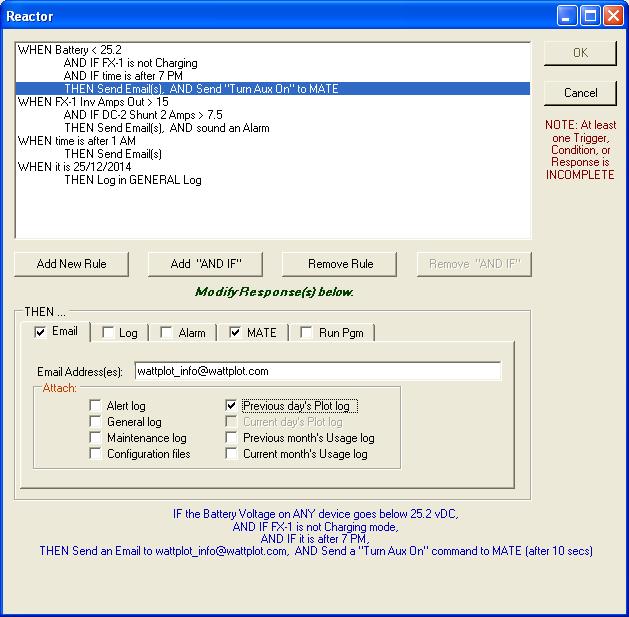
- Supply additional conditions: IF this AND that AND that, THEN do this. This permits you to easily create very responsive actions, such as "If the Battery Voltage is less than 24.8V, and it is after 7pm, and the inverter is in AC Drop, then Start the Generator." A similar rule appears in the sample screen above. You won't find an easier interface anywhere.
- You can even temporarily disable any trigger or condition at any time, without deleting it. That's a real convenience, rather than having to create it from scratch every time you want to use it.
Bells and Whistles
The original WattPlot was designed to be installed on 1990's PC hardware. While that made it compatible with older systems, the programming functionality was limited. WattPlot™ 5 was written in a state-of-the-art programming environment, giving us enormous opportunities to expand the program in many directions. And we never miss an opportunity to make a zillion little enhancments:
- No more waiting for trial licenses to be created and set from the WattPlot offices for new users. Now WattPlot can issue its own trial activations by email!
- Are you running WattPlot™ 5 on an unattended computer? Our new Auto-Start option will automatically add the Monitor program to your Windows startup menu. Easy!
- Responding to so many user requests for tweaks and features means that new releases are frequently available. And yes, we sometimes have subtle bugs that have to be corrected as different OutBack installations stretch the software in different directions. WattPlot™ 5 can now automatically check to see if new releases are available, show you the details, and give you the option to update your software. Of course, all updates are still free-of-charge.
For more information, see our WattPlot page or contact us.

