
WattPlot™ Monitor (version 5) is no longer being supported,
however, the production version is still available.The plan was to replace it with WattPlot™ ACKcess (version 6). Alas, the final stages of that development have been stalled due to the collapse of OutBack Power Systems support. Still, enough effort was put into WattPlot™ ACKcess that is available as well, as is.
We will continue to make WattPlot Monitor available, on request, to sites running older OutBack Power Systems equipment, such as the MATE or MATE2, or for older PCs unable to run the WattPlot™ ACKcess software. Otherwise, we recommend that you download WattPlot™ ACKcess version 6, which offers greater functionality and supports more recent components.
WattPlot™ has always been the friendliest OutBack MATE monitoring software ever. Since 2005, we've worked hard to give our users all the features that they asked for. WattPlot provides sophisticated capabilities for industry professionals, but always gives the beginner assistance and information that is not available anywhere else. In 2012, we embarked on an ambitious two-year project to rebuild our original product, WattPlot Monitor, using a more powerful development environment and all the ideas accumulated over almost a decade of OutBack system monitoring. WattPlot™ Monitor 5 was the result.
As the most stable flagship program in our suite of tools for monitoring renewable energy systems from OutBack Power, WattPlot™ Monitor incorporates all the functionality of our most popular applications: WattPlot™ VisualMATE, WattPlot™ NetMATE, and WattPlot™ SumMATE.
See it Running Now Over the Web
Answers to Frequently Asked Questions
Look through the User's Guide (as a pdf)
Download a free, fully-functional copy of WattPlot™ Monitor!
OR update an existing Version 5 installation
OR update an existing original (version 4) installation
Users of the original WattPlot (version 4) can update for free, however, the update to version 5
will require a full new download (using the above button) and installation.
Displays a real-time scrolling pen plot of all inverter and charge controller activity, as it happens.
Logs and archives all data coming from the MATE (per second) in a proprietary compressed format, and optionally as the raw MATE data.
Allows viewing of all historical activity (second-by-second, if desired).
Supports remote monitoring of a Mate by one or more PCs (through TCP/IP).
Can be run unlicensed as a free sophisticated Viewer, allowing you to view your system from anywhere, and allowing anyone to view precise performance from logs you can email.
Multi-Document Interface (MDI) can show pen plots for multiple devices.
Can combine output for multiple stacked inverters or multiple charge controllers on to one plot.
Optionally logs all mode changes, warnings, and errors. You know precisely what happened and when.
Generates power usage data as spreadsheet files, openable by any spreadsheet application.
Transmits commands to the MATE on demand, or by user-defined triggers.
Can automatically respond to user programmable alerts or scheduled events, sending emails, MATE commands, and more.
Keeps important battery bank records, such as equalization charges, specific gravity readings, and more.
Supports systems with multiple MATEs.
What's New for Version 5?
Hardware Support
WattPlot™ 5 supports monitoring the new MATE3 device (by network UDP/IP or USB cable), and it supports the new Radian inverters - that much you would expect. It is also quite comfortable on all the latest Windows platforms, with no special settings. But check out some of these features:
- Process every data file on your MATE SD memory card with a single mouse click! All data will be captured and summarized into industry-standard spreadsheet files, and the original files will be automatically copied/moved into sorted monthly folders. Of course, WattPlot can graph the summary files for you, show daily plots, and allow you to drill down to each second on each device.
- Purchasers of OutBack FLEXpower units want everything preconfigured and ready to go. So WattPlot™ 5 delivers the same convenience when monitoring them. Select your FLEXpower model type from the dropdown menu in the system configuration screen, and everything will be filled in for you.
- We've also adopted a new approach to changes made to your actual OutBack system. If you add a new device or upgrade your MATE to a MATE3, WattPlot will automatically adjust its configuration. Plug and play!
Pen Plots

WattPlot's signature real-time pen plots have always been a great feature from our very first release nine years ago. Now WattPlot™ 5 adds in all the features you've always longed to see for those pen plots:
- Resize the plot windows to any size you want. Select scatter plots or continuous lines, thick or thin, in resolutions of 1 second, 1 minute, or 3 minutes - giving you the whole day's performance at a glance. Just double-click to zoom in!
- First, we had plots by device, Then we added Reporting Sets, allowing you to group multiple devices of the same type on a single graph. Now you can put all the devices for a single MATE on one pen plot, giving you a complete power production picture in one screen.
- WattPlot™ 5 also shows you your pen-plot data at the exact time that it was generated. For example, if you are viewing MATE3 data that was logged every 5 seconds, you will see the gap between the plot points (when viewed at 1-second resolution). No more invisible time jumps when monitoring was interrupted.
Greater Accuracy
The original WattPlot would log data, as it arrived, in one long sequence, and record meaningful data. WattPlot™ 5 increases the accuracy and precision of your data values in a number of ways:
- As noted above, every second of data is precisely indexed to the second that the data was generated.
- MATEs in other time zones can be monitored with time zone differences taken into account.
New Views on Data
WattPlot™ 5 goes way beyond pen plots for viewing your data. Here are some of our newly added screens:
- WattPlot's innovative monthly bar and line graph summaries are still available, but we've added a new Daily Summary screen. By opening a MATE3 CSV file, Raw-Data-Capture OBM file, or selecting a WattPlot-monitored day, you can view the full system's performance numbers on a single colour-coded screen.

- Our unique and popular VisualMATE™ tool gives users an animated view of their entire system's power flow in real-time. The WattPlot™ 5 Monitor program (PRO version) now offers the VisualMATE window as a built-in option, along with all of the plots, etc.

- For true convenience, it also has a built-in browser screen for viewing your MATE3's web interface directly.
Automatic Actions
We were the first software provider to offer Automatic Actions (MATE commands, email, alarms, etc.) in response to user-defined trigger conditions. WattPlot™ 5 takes that concept to the next level, with a host of added capabilities:
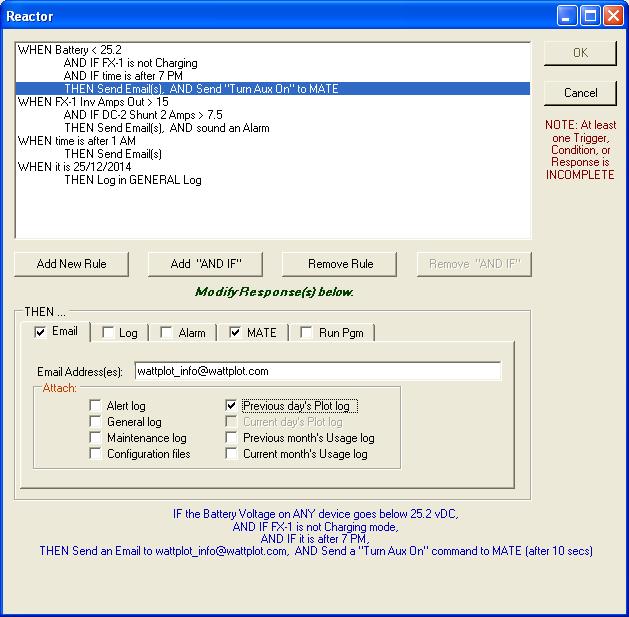
- Supply additional conditions: IF this AND that AND that, THEN do this. This permits you to easily create very responsive actions, such as "If the Battery Voltage is less than 24.8V, and it is after 7pm, and the inverter is in AC Drop, then Start the Generator." A similar rule appears in the sample screen above. You won't find an easier interface anywhere.
- You can even temporarily disable any trigger or condition at any time, without deleting it. That's a real convenience, rather than having to create it from scratch every time you want to use it.
Bells and Whistles
The original WattPlot was designed to be installed on 1990's PC hardware. While that made it compatible with older systems, the programming functionality was limited. WattPlot™ 5 was written in a state-of-the-art programming environment, giving us enormous opportunities to expand the program in many directions. And we never miss an opportunity to make a zillion little enhancments:
- No more waiting for trial licenses to be created and set from the WattPlot offices for new users. Now WattPlot can issue its own trial activations by email!
- Are you running WattPlot™ 5 on an unattended computer? Our new Auto-Start option will automatically add the Monitor program to your Windows startup menu. Easy!
- Responding to so many user requests for tweaks and features means that new releases are frequently available. And yes, we sometimes have subtle bugs that have to be corrected as different OutBack installations stretch the software in different directions. WattPlot™ 5 can now automatically check to see if new releases are available, show you the details, and give you the option to update your software. Of course, all updates are still free-of-charge.
Some Comments from the Experts
"Forget all this crazy Outback configuration mess. It's not worth the effort.
Buy WattPlot Pro and the USB Card for the Mate. Use the "Define Automatic Functions" feature to set up when to connect, when to drop, what to sell, throttle back, you name it. AND have it send you a text message when it switches over or even email you an -end of the day- summary.
I'm still refining the specific automatic functions and parameters, but with great support from Andrew at Intallact and the freedom to decide pretty much any setting, I'm already better off than I was when struggling with the Mate3 alone. I don't even care about the mate3's drawbacks anymore..."
- Lance Michel, Naples NY
"I've seen a couple of other companies attempt to do this, but I really like the simplicity of the interface as Andrew showed me how it tracks and logs every second of performance of his LAKOTA-based hybrid system . . . Andrew's done a very nice job of making a good intuitive interface. He's made the necessarily complex control structures of the Outback easy to manipulate. WattPlot displays the simple performance data of any parameters you want to know about. . . how much power is the system making right now, last night? . . or last month? . . and what configuration is best for my system to get the best performance? . . . Outback has made a beautifully versatile power management and control system with lots of very useful features. All it needs is a little WattPlot to make it more user friendly for the average-techie who wants to see the power of the whole system, second by second or over the last month."
- Dave Cooke - True North Power (Outback Dealer)
"I'd like to tell you what a pleasure it is to be working with WattPlot 4.2.5-XP with all the bells and whistles embedded and accessible using Win XP available in the "High Color - 32bit" mode. The additional information makes the NT version seem so Spartan! Additionally, the transition from 31 Dec '08 to 01 Jan '09 was seamless ... leap second included.
Now that I have a modern laptop with WI-FI and Blue Tooth installed, I may try remote accessing my WattPlot data (I will have to read all about it before I try ... )
Thanks again for making the migration painless !!!
PS: Thanks also for your relentless pursuit of program perfection and customer support!"
- Dave Lazok, Buena Park, CA
"The capture capability proved very useful. I used graph from March and last month to prove to my installer that something had changed when he replaced a FET board in one of the inverters. He is now a believer in your software."
- Andreas Jensen, Irving, TX
"I just wanted to take a moment relate my experience with this system over the years and to thank Mr. Welch for his prompt and courteous customer support. I have found the WattPlot software to be an integral and indispensable tool in this renewable energy installation."
- David Demos, Leland, NC
"WattPlot PRO is the first site I use daily and depend on it constantly to monitor my system. If my computer is on, WattPlot PRO is on."
- Ray Nicholls, Willard, MO
"I must say that the system, your company’s response for activation, and accompanying documentation all worked well to make the installation a snap, and this comes from one who was in the high-tech industry for 30 years."
- Ken Schwantje, St. Lawrence College’s Energy House, Ontario, Canada
"Over the past year, iCeL Systems has joined forces with WattPlot, a comprehensive software tool which provides real-time reporting on renewable energy system data. WattPlot allows iCeL customers to monitor their energy storage systems remotely via desktop or smart phone. For the Anaheim Energy Field project, iCeL CTO Dr. Ryan Wartena, made some special requests of WattPlot. Wartena was extremely impressed with WattPlot’s ability to completely exceed expectations by developing a whole new product to meet iCeL’s needs for the Energy Field, which feeds into the Anaheim Public Utility grid."
- Ryan Wartena, iCeL Systems, Van Nuys, California
"When I first began researching monitoring solutions (before my system was even installed), I was pleased to find that there were several options available. WattPlot seemed the best fit for what I wanted to achieve. When I contacted Andrew Welch about the system summary logging, I expected an answer along the lines of "We don't do that, but maybe someday in a future release..." However, Andrew sent an enthusiastic reply, and in short order, a beta version of the latest WattPlot software for me to try that included the new feature I had requested. Awesome!!"
- Sallye Holloway, WoofPower.us
"WattPlot is pretty much exactly what we were looking for in terms of a product to monitor the Outback equipment.
We've been using WattPlot for quite some time now, and it's continued to correctly interpret data from our long-range serial server system, and provide us all of the useful data that we've needed. It's a superb program, and I can't thank you enough for the help you've given us in implementing it.
Thanks so much for such a wonderful product. It's really made my life a lot easier (having been pressed into the role of expert on the power-generation system here at the company)."
- Brian Adamson, Jeffus & Williams, Juneau, Alaska
"I just [...] downloaded and read your user's guide for WattPlot. Wow - that's just exactly what I wanted! It even has pictures of the hardware connectors! I also want to compliment your tech writer. Very user-friendly user guide. So many 'user guides' are still in 'tech-ese'!
I'm so excited to get data collection all the time!! It makes it so much easier to analyze what's going on.
Finally, I wanted to say that I'm so glad your programming background inspired you to write this program. I don't have a programming background, but I'm a systems analyst, so that's exactly what I was trying to do - gather enough information to analyze the effect of the various settings. The Outback manuals aren't very user-friendly (they need your tech writer, obviously), although they're getting better. Even their explanations of the settings are like reading Greek.
I'm going to get a cable to interface my computer as soon as I can, and download your WattPlot software. THANKS!!!"
- Loretta Liefveld, Three Rivers, CA
"WattPlot is a really nice piece of software and we recommend it to customers on a regular basis."
- Matt James, Customer Service Manager, OutBack Power Systems
"I'm monitoring my remote solar system in Maine, which is 2 hrs away from my home in Massachusetts. Your program works great with a Verizon MIFI router, OpenVPN, and Remote Desktop. I'm interested in someday looking into the TCP/IP capabilities of your system but right now it's working great so I am happy. [...] Thanks for making a great product at a great price. I've looked at the other Outback monitoring systems and your product definitely has the most bang for your buck."
- Tim Piper, Newburyport, MA
"I was really glad your initial response to my suggestions (way back when) was to gather more information, and not the standard "we'll think about that for the next release".
One nice thing about WattPlot is the constant logging to disk. With WinVerter, if a power failure or other event occurs during the night/early morning hours, I have no way of knowing what time we switched to battery power until after midnight (when the logs are saved to disk). Utility power went out Friday at 3:10am, and the batteries died at 6:00am after the coffee pot turned on at 5:30.
This is an excellent piece of software. Now, if only Outback would make the Mate with two-way communication, so I could use this software to program the system as well..."
and several years later...
"WattPlot has been excellent for me, and has been running almost non-stop on an old laptop for several years now, so I have no complaints. I haven't upgraded to the latest version yet, still running version 4.2.4 on Windows XP, but I plan to upgrade soon."
- James Stringham, http://www.wiseowlnetworks.us
"WOW!!! This is an amazing program! The description and screen shots do not do it justice. I'm not sure I will ever master it, but it should be all that I ever need. As I mentioned in an earlier email, I hope to be adding a wind component shortly. It will be VERY interesting to see those results. I'm excited to see the graph results of the MX - if we EVER see the sun again that is!! I'm still 'playing' around with the program and have managed to turn off the power in the house - I had inadvertently turned off the inverter and then dropped the AC input, all from WattPlot. Amazing!!"
- Ron Bell, Ontario, Canada
"What I have seen in the data logging area is excellent, exactly what I expected. WattPlot is easy to install, easy to configure and produces great output. I am happy with it. The manual is a model of style and easy understanding. I will be purchasing the WattPlot today as I don't want to miss any days of the system's operation."
- Toby Brine - British Columbia, Canada
"During the run thru with the [client] we had to check open circuit voltages for all the PV modules. It was our second day onsite the barge was leaving soon, we were slightly rushed but enjoying ourselves, and as I checked voltages at each breaker at the PV combiner boxes one fellow went ahead and unlocked the other boxes, while another trailed behind and tugged on wires and flipped the breakers back on. At the end of the day while I was showing off the WattPlot software I noticed two of the 6 MX's were not charging. If it wasn't for the clear layout of the software, and the ability to compare devices all on one screen, I would have never of realized that a bunch of breakers hadn't been flipped back on. That's when I was sold."
- Jason Lerner, Waldron Power and Light Co., WA
"Wow, great program -- much, much better than WinVerter -- now I'm glad they didn't respond or I wouldn't have found your program. I'm sure I'll be purchasing soon.... just want to spend a little time with the program and the in-depth manual. Thanks!"
- Kit Watkins, Cary, North Carolina
"It's been up and running now since last Monday and so far I'm very impressed and happy with the product. You obviously spent a great deal of time and did a fantastic job. It's pretty much exactly what I was looking for!!! Thanks"
and over a year later...
"I sure hope WattPlot sales make up for the amount of support you provide to us users. So far it’s certainly been a pleasure dealing with you personally and I can’t say enough good about the software. Without WattPlot the Outback systems are just a bunch of expensive, pretty lights!!!!"
- Ric Murphy, Ontario, Canada
See WattPlot in action right now on user web sites:
Tennessee Technology Center - Green Electrons & Ham
WoofPower, using new WattPlot System Summary-by-Minute function!
Morris Keys Grid-Tied Solar Home - OLD LINK
Morris Keys Grid-Tied Solar Home - NEW LINK
Fint Solar/Wind Company in Granada Hills, CA
Boca Solar Home: Web Site with WattPlot or WattPlot WebCam!
Owl People Solar Project: Web Site with WattPlot PRO and Background Information
WattPlot customized Remote, feeding a beautiful Flash display
For more information, see our WattPlot page or contact us.


